A guide for families
Make games with your kids.
Your child invents a game. An AI helper writes the code. By the end of the afternoon it's on the web.
Your child designs it
They choose the game and how it looks. You type and press the buttons.
Learning by making
Change a few things, play, repeat. Every change shows on the screen. No coding needed.
Play together, anywhere
Friends open your game in their own Family Arcade. Up to four devices join with a 4-letter code.
A basic game in an afternoon
Section titled “A basic game in an afternoon”The first game is basic: a few shapes and one thing to do. It works quickly, so your child sees results.
-
Start from the template. It becomes your game’s home on GitHub.
-
Tell Claude your idea in one sentence. Claude asks a few questions, then builds a basic game.
Say or typeMake a game where you are a dragon collecting gems in the clouds. -
Put it on the web. One setting gives your game its own address.
-
Make it better, two or three changes at a time. Play after each one.
-
Play with friends in the Family Arcade.
Step by step, for a parent and child together.
Playing together in the Family Arcade
Section titled “Playing together in the Family Arcade”Friends add your game to their own Family Arcade at familyarcade.eu. One device shows four letters. The others type them.
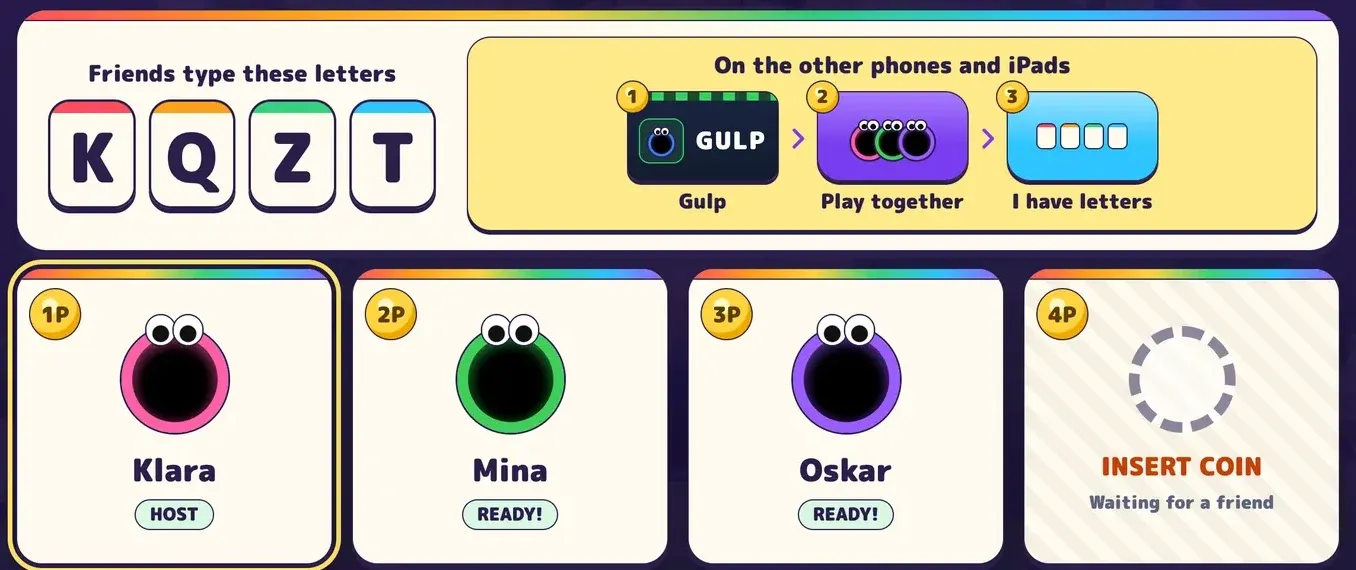
Three friends about to play Gulp.
Three things to start
Section titled “Three things to start”- An hour, and a computer.
- A free GitHub account. It keeps your game’s code and puts it on the web. For a child under 13, it is a grown-up’s account.
- An AI helper. This guide uses Claude Code, part of a paid Claude plan held by a grown-up. Free options for teenagers exist too.
Safe by design
Section titled “Safe by design”- No ads and no tracking, in the arcade and in every game made from the starter template.
- Only people with your code can play with your child. There is no chat and no public list of players.
- Players and saves stay on your device. There are no accounts to sign up for.